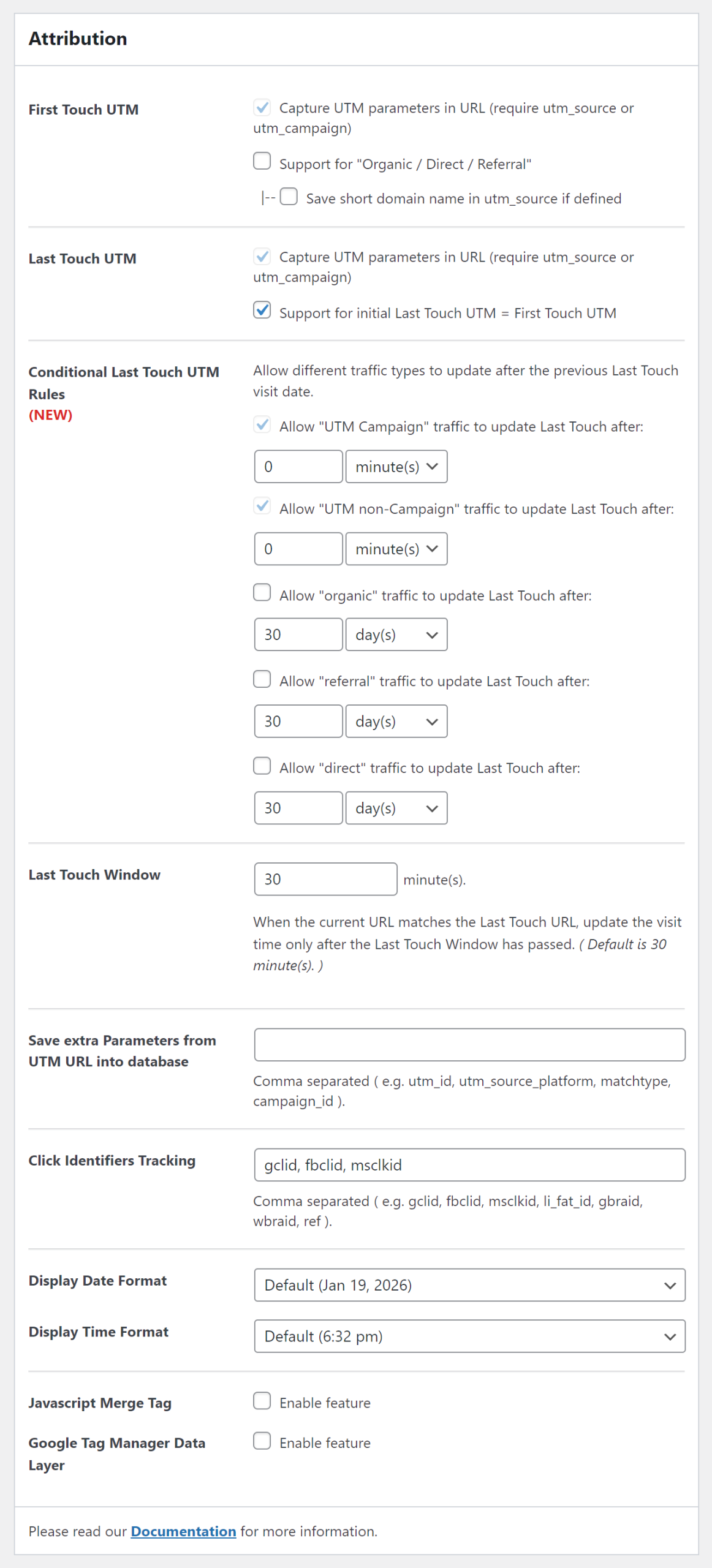
First Touch UTM
Support for “Organic / Direct / Referral”
We have introduced Settings to enable “Organic / Direct / Referral” in the First Touch UTM report.
When it is Enabled and visitors lands on your website without actual UTM parameters in the browser address bar, our AFL UTM Tracker plugin will determine the utm_source and utm_medium based on the referrer website.
e.g Visitor browses to your website by entering your website URL in the browser address bar.

utm_source = direct
utm_medium = none

e.g Visitor clicks on an organic search result on Google.

utm_source = www.google.com.sg
utm_medium = organic

e.g. Visitor clicks on a link on medium.com

utm_source = www.medium.com
utm_medium = referral
Save Short Domain Name
If you enable short domain name, we will save the utm_source as “google” instead of “www.google.com.sg”.
Here’s the list of websites which our plugin recognized for short domain name.
Last Touch UTM
Support for initial Last Touch UTM = First Touch UTM
When the “Support for initial Last Touch UTM = First Touch UTM” is enabled, our AFL UTM Tracker plugin will copy the First Touch UTM into the Last Touch UTM. This allows digital marketers to get the Last Touch UTM parameters even when the visitors convert on first touch.
When it is disabled, there will be no data for the Last Touch UTM on the first visit. This allows digital marketers to easily differentiate conversions which require more than one touch point.
Conditional Last Touch UTM Rules
Starting from version 2.30.3, you can allow different traffic types to overwrite the Last Touch UTM after a certain duration from the Last Touch Visit Date had passed.
By default, any new traffic coming from “Organic / Direct / Referral” will not overwrite the Last Touch UTM. This provides an edge to marketing team to only track landing URLs with actual UTM parameters because conversions are often overly attributed to “organic” or “direct” in popular analytic tools like Google Analytics.
But for marketing teams that relies heavily on non-paid campaigns then setting up the Conditional Last Touch UTM Rules will help a lot in your conversion attribution. For example, to allow “organic” traffic to replace the previous Last Touch UTM visit after 14 days, follow the steps below:
- Enable the checkbox ‘Allow “organic” traffic to update Last Touch UTM’.
- Set the duration to 14 days.
- Save settings and clear page cache.
Traffic Types
- UTM Campaign – traffic with utm_source and utm_campaign parameters.
- UTM non-Campaign – only has utm_source without utm_campaign parameter.
- Organic – only traffic from search engines.
- Referral – traffic from other websites.
- Direct – traffic directly to your website.
Last Touch Window
When the current page URL matches the Last Touch URL, update the Last Touch visit time only after the Last Touch Window has passed. ( Default is 30 minute(s). )
Save Extra Parameters from UTM URL into the database
By default, our AFL UTM Tracker plugin extracts the following UTM parameters from the First and Last Touch UTM URLs and saves them into the database:
- utm_source
- utm_medium
- utm_campaign
- utm_term
- utm_content
You can also extract Custom Parameters by adding them into the list. Some examples below:
utm_source_platform, utm_marketing_tactic, utm_creative_format, utm_id, campaign_id, matchtype, refClick Identifiers Tracking
By default, our AFL UTM Tracker plugin tracks the following Click Identifiers:
- Google Click Identifier (gclid)
- Facebook Click Identifier (fbclid)
- Microsoft / Bing Click Identifier (msclkid)
You can add new Click Identifiers or remove existing Click Identifiers from the list. Each Click Identifier must be separated by a comma symbol. Some examples below:
gclid, wbraid, gbraid, li_fat_idNOTE: Additional cookies will be used for each click identifier. Please make sure that your server HTTP header size can accommodate more cookies.
View List of Click Identifiers.
JavaScript Merge Tags
When the Javascript Merge Tag feature is enabled, you can populate UTM parameters and Click Identifiers into hidden fields using our Javascript Merge Tags.
Google Tag Manager Data Layer
When the Google Tag Manager Data Layer feature is enabled, AFL UTM Tracker plugin will push the attribution data to Google Tag Manager. You will then be able to access the UTM parameters of the visitor in your GTM container. Learn more >