With our AFL UTM Tracker plugin, you will get access to the following user attribution data:
- WordPress User Sign-up/Registration Attribution Data
- WordPress User Active Attribution Data (the latest attribution)
Exporting Reports
Your can export the WordPress User attribution using any third-party user export plugin that supports entering custom user meta.
Why have we not included the export feature in our plugin?
At the moment, we rely on third-party plugin because it can provide more advanced exporting feature which will work with wider custom user data from other plugins.
WordPress User Meta List
Refer to our WordPress User Meta List for the full list:
Install Export Plugin
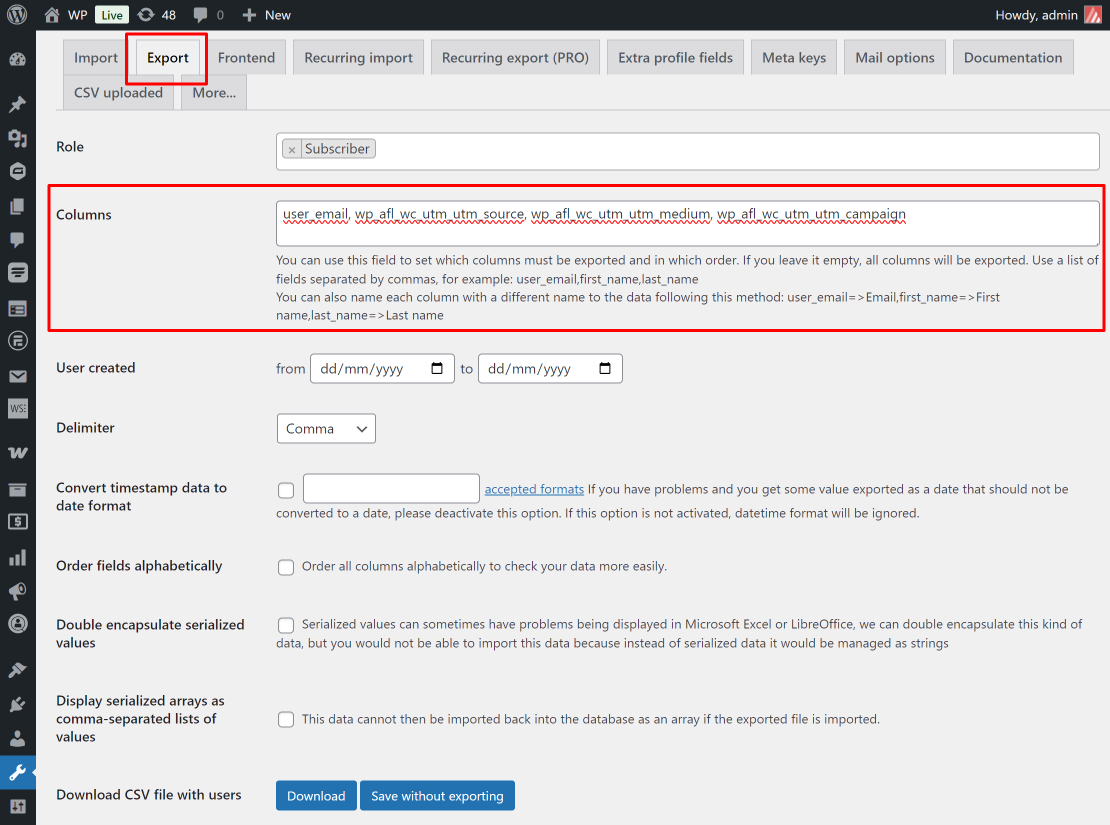
- Install the free Import and Export Users and Customers plugin (WordPress.org).
- Go under Tools > Import and export users and customers.
- View the “Export” tab.
- Enter a list of user meta field name separated by comma. For example:
e.g User Signup – First Touch UTM
user_email, wp_afl_wc_utm_utm_source_1st, wp_afl_wc_utm_utm_medium_1st, wp_afl_wc_utm_utm_campaign_1ste.g User Signup – Last Touch UTM
user_email, wp_afl_wc_utm_utm_source, wp_afl_wc_utm_utm_medium, wp_afl_wc_utm_utm_campaigne.g User Active – First Touch UTM & Last Touch UTM
user_email, wp_afl_wc_utm_active_utm_source_1st, wp_afl_wc_utm_active_utm_medium_1st, wp_afl_wc_utm_active_utm_campaign_1st, wp_afl_wc_utm_active_utm_source, wp_afl_wc_utm_active_utm_medium, wp_afl_wc_utm_active_utm_campaign- Save without Exporting.
- Download.